Delete My Account
We are sorry to see you go
We believe in absolute transparency and user control. If you wish to delete your Zynos AI account, your custom AI models, your cloned voice data, and all compiled videos, you can do so directly and securely inside the mobile application.
How to Delete Your Account
Account and data deletion is completely self-serve. Simply follow these steps:
- Open the Zynos AI application on your device.
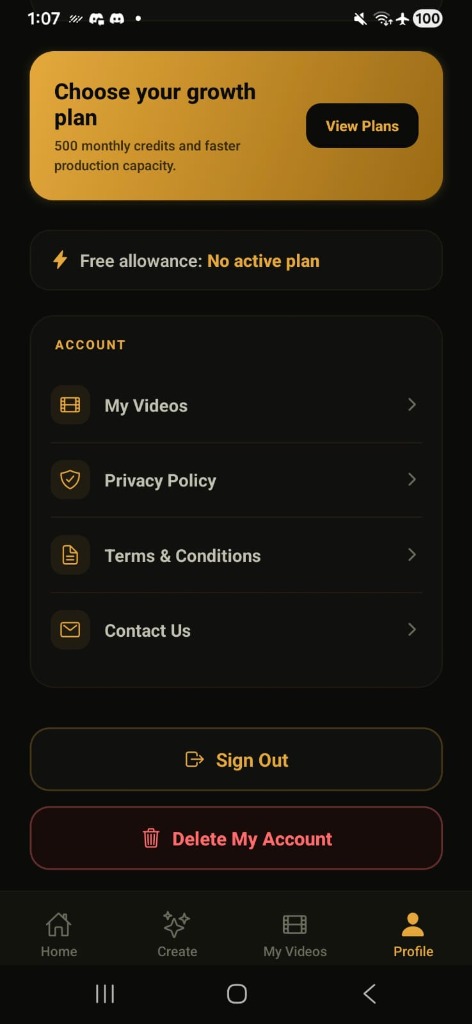
- Navigate to the Profile tab on the bottom menu bar.
- Scroll down to the bottom of your profile dashboard.
- Click the red Delete My Account button.
- A confirmation dialog will appear. Click Confirm Delete to complete the process. All your database records, voice matrices, custom avatars, and credits will be immediately and permanently erased.
Important Data Retention Notice
- Immediate Data Scrubbing: Your custom-trained voice print models, generated video clips, and avatar selfies are completely and permanently scrubbed from our cloud storage and AI engines instantly upon confirmation.
- Subscription Cancellation: Please note that deleting your Zynos AI account does not automatically cancel active subscriptions managed by your device's app store. Remember to cancel your subscription inside your Google Play Store or Apple App Store account settings to avoid future billing.
- Direct Assistance: If you face any issues deleting your account or want to verify data erasure, please contact us at support@zynosai.com.